

Whether you’re just getting started as a freelancer or you’ve been in the game for a few years, imposter syndrome can be a real, debilitating issue.
You know the feeling: wondering if you should use “I” or “we” when referring to yourself in conversations with your clients. Or getting that jittery feeling when your client asks who handles invoices on your team (it’s you… everything is you).
For freelancers who are on the hunt for high-quality, big-budget clients, making your business look as legitimate as possible is crucial.
So if you’re ready to stop having clients ask “how can it cost this much, you don’t have any overhead?”, this article is for you.
We consulted with our expert friends at StartGlobal (who can help you get incorporated or get a street address, phone number, and more), and we’ve identified a few easy ways you can make your freelance company look more legit this year. After you run through the list, we hope you’ll feel a spike in confidence and translate that into a bump in revenue.
You’re legit. Your freelance work is legit. Now, it’s time everyone knows it.
Here are 6 ways to make your freelance company feel more legit:

1. Incorporate (S-Corp or LLC)
Incorporating as a freelance business is a good idea if you’re in this thing for the long-haul.
Upgrading from a sole-proprietor to an S-Corp or an LLC can mean some nice added benefits. Not only can you reap some nice tax benefits (saving money and protecting your assets), but you can also reduce potential liability on yourself personally.
When you’re a corporation, you pay taxes differently and you’re able to write off a lot more business expenses than if you’re just an individual in business. In fact, many freelancers who decide to incorporate save anywhere from $10,000-15,000 in taxes their first year.
Whoa!
Not only that, but if a client relationship goes terribly sour, your personal assets (your home, your car, etc) are more protected if you’re a corporation than if you’re an individual.
If you haven’t looked into incorporating your freelance business, it’s probably time you did.
Companies like StartGlobal can help you through the process for a pretty affordable fee so you can rest assured it gets done right and get back to the work you enjoy most. They are even offering $50 off to the Millo community, so don’t hesitate to take advantage of it.
2. Get a physical address (that’s not your house)
If you’re freelancing from your home, it can be a little embarrassing putting your own personal address on your invoices.
All it takes is one basic Google Maps search to realize that you’re not a well-established agency. But just because you work from home, doesn’t mean you shouldn’t be allowed to charge more for your work.
That’s why step 2 on our list of making your freelance business feel more legit is to get a physical address where you can “send” and receive mail as a company—instead of as a singular person.
You can also keep the crazy clients from knocking on your home door with last-minute changes and requests.
Setting up a physical address other than your home doesn’t require you to lease office space or set up a brick-and-mortar location either. And you don’t have to constantly check a P.O. box to get your mail (what a pain).
Thanks to companies like StartGlobal, you can set up a physical business address in the U.S. that you can then put on your invoices, marketing material, or contact information.
You’ll get a physical street address in the United States along with mail forwarding and scanning services so you never have to check your mailbox again. Instead, your mail comes to you digitally or gets forwarded to your home address on file.
3. Set up a self-employed bank account
If you have a hard time keeping track of your expenses or regularly look at the amount in your account not knowing what to expect, it might be time to set up a self-employed bank account.
Separating your personal account from your business account will make managing your business finances far easier.
You’ll be able to keep an eye on your income and identify expenses that are eligible for tax deductions. It also makes your business more feel more legit when clients have to send you a check or make a payment by wire to your account.
Using the same bank for your personal and company account might be easiest.
4. Get a debit card for business expenses
As mentioned above, tracking business expenses can quickly become messy. Especially now that you’re a corporation and can write off even more expenses.
Which means it’s worth the effort to get a complete handle on your money.
To make things easier, you may want to consider getting a business debit card to go along with your new business bank account.

Now that you have a company bank account, ask for the debit card that goes with it. Almost all accounts do. You will be able to use it for your business expenses so they can be easily tracked and categorized in your favorite bookkeeping software..
By using your debit card, you avoid the nightmare of having to enter all your expenses manually with the receipts attached to it, saving you hours each month.
If you are lucky, your bank might even offer company credit cards as well so you can enjoy some cashflow flexibility.
5. Claim a U.S. phone number for business calls
Another way to add more legitimacy to your freelance business is to claim a U.S. phone number where potential clients can call for a quote or current clients can call for updates.
And a business number isn’t just for inbound calls either. Having a business number you can make sales calls from just might be the thing you need to boost your client-finding efforts.
That’s not surprising since one study estimates the average professional (think: your potential clients) receives over 120 emails per day. That’s a TON of email.
On the other hand, phone calls are much less common. Which explains why another study estimates phone calls receive an 8.1% response rate, compared to .03% for email.
That means you’re over 270 times more likely to actually get through to a client using the telephone. Well worth the investment in a business line.
If you think having a business phone number might prove profitable to your freelance business, have a look at StartGlobal. In addition to all the stuff listed above, they can help you get a high-quality U.S. phone number for your freelance business.
6. Get a professional email address
Of course, no business today can survive without email. Whether you’re sending a proposal or emailing your past clients with a discount, email is critical to making your freelance business run smoothly.
But having an email address that’s unprofessional can do more harm than you might think.
Instead of using something like gmail, Yahoo mail, or Outlook for your business email, consider getting a more professional email address so you play the part of a “real” business when communicating with the outside world.
As outlined in our guide below, having a professional email address can benefit your freelance business in a number of ways.
Not only will it build credibility and trust with people you communicate with (clients, sub-contractors, vendors, etc.) but it’s an automatic brand-awareness mechanism, reminding your clients of your business name each time they send you an email.
For more information, try our in-depth guide for getting a professional email address.
Every bit helps…
Now that you’ve read our list for adding legitimacy to your freelance business, it’s time to take action.
If you’re ready to save yourself some money at tax time, maybe you ought to incorporate your business.
If it’s time to un-muddy your personal cash with your business finances, it’s probably time for a separate bank account.
Whatever stood out to you from today’s article, our advice is simple:
Take action.
Be the less than 1% of people who read this article that will actually do something to better their situation. You’ll be glad you did.
To make it simple, you may want to click here to take a look at our friends StartGlobal who supported and helped with this article. You will also automatically get $50 off your order.
StartGlobal is an insanely cool startup backed by some of the brightest minds in business (like Twitter co-founder Biz Stone).
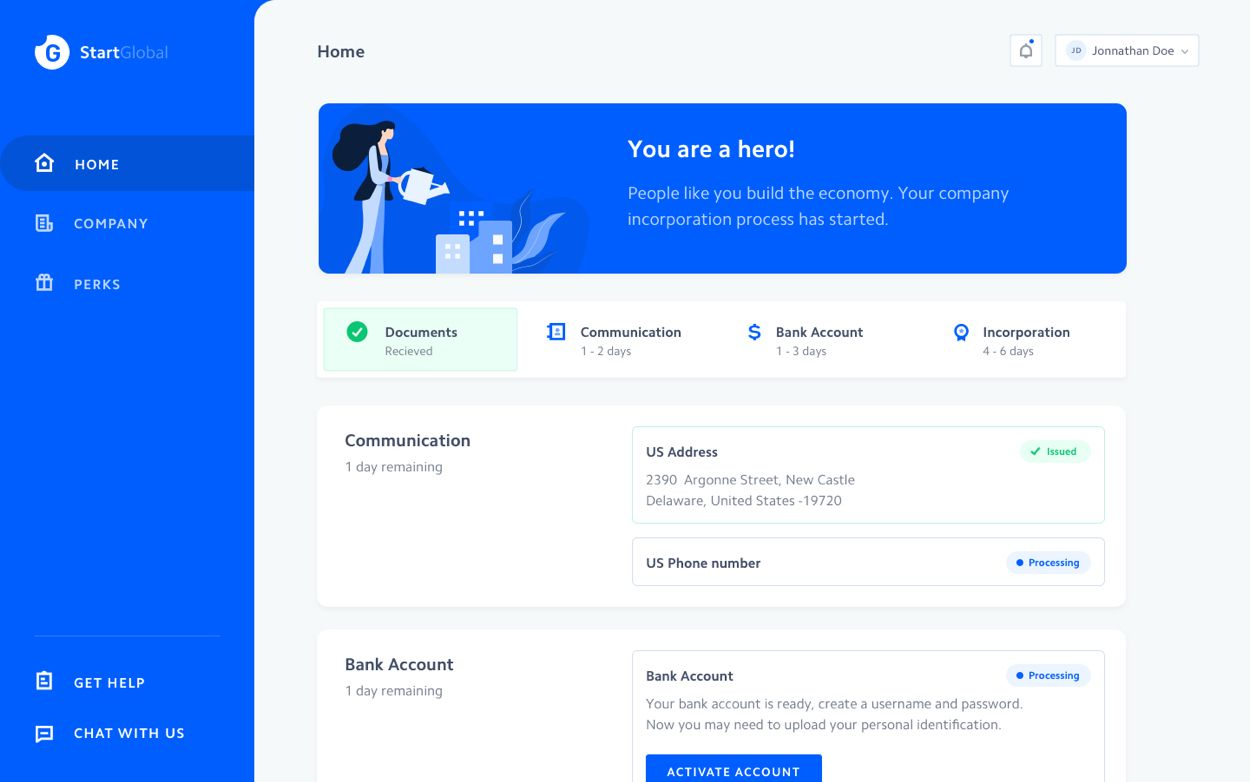
StartGlobal will also get you a bank account at no additional cost along with a U.S. phone number and U.S. address to streamline your business whether you are running a freelance business, e-commerce or a high growth startup.
Everything is handled from a single dashboard from start to end. You will also get to speak with an attorney and a CPA and the end of the process if you have any questions.
Keep the conversation going...
Over 10,000 of us are having daily conversations over in our free Facebook group and we'd love to see you there. Join us!
